
Securing the Entra ID connector ACI configuration file
The Azure Container Instance version of the Signature 365 Entra ID Connector can load its config.json file from a storage account where public network access is disabled.
The required configuration uses a network path between the Azure Container Instance and the Blob service private endpoint. The Azure Container Instance and private endpoint can be deployed within a single customer-managed virtual network.
Supported network configuration
For a self-contained virtual network configuration:
- Deploy the Azure Container Instance into a dedicated subnet delegated to Microsoft.ContainerInstance/containerGroups.
- Create the Blob service private endpoint in a separate subnet within the same virtual network.
- Link the privatelink.blob.core.windows.net private DNS zone to the virtual network.
- Ensure the storage account hostname resolves to the private endpoint IP address from the Azure Container Instance.
- Allow HTTPS traffic over TCP port 443 between the Azure Container Instance and the private endpoint.
- Disable public network access on the storage account after private connectivity and DNS resolution have been verified.
The Azure Container Instance and private endpoint must use separate subnets because the subnet delegated to Azure Container Instances can contain only container groups.
Network diagram
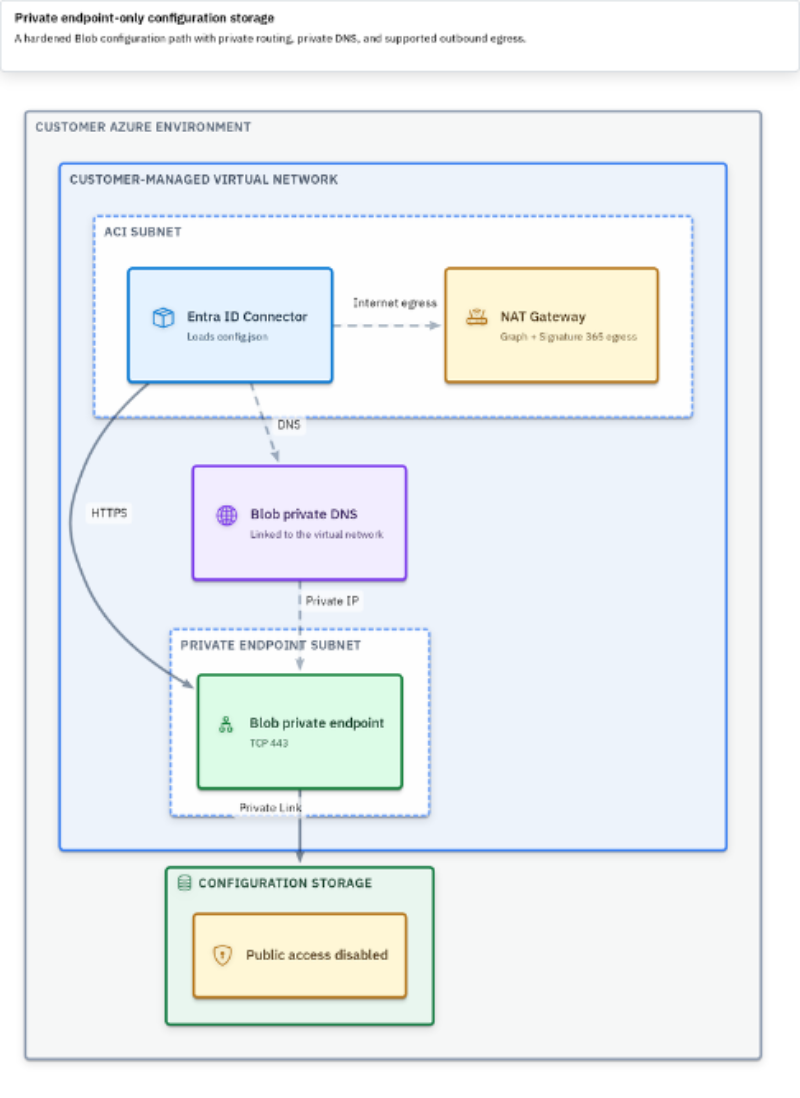
The storage account remains an Azure platform service outside the virtual network. The Blob private endpoint provides a private IP address within the customer virtual network and carries the connection to the storage account through Azure Private Link.
DNS configuration
The connector should continue to use the standard Blob URL for config.json, for example:
https://<storage-account>.blob.core.windows.net/<container>/config.json
From the Azure Container Instance, this hostname must resolve to the private IP address assigned to the Blob private endpoint. When Azure Private DNS is used, link the privatelink.blob.core.windows.net private DNS zone to the virtual network.
If the virtual network uses custom DNS servers, configure equivalent name resolution or forwarding so the Blob hostname resolves to the private endpoint IP address.
Storage authentication
Private network connectivity and storage authentication are separate controls. The identity used by the Azure Container Instance must retain permission to read config.json from the Blob container.
Restricting the storage account to its private endpoint does not replace or change the connector's existing Blob authentication requirements.
Uploading or updating config.json
After public network access is disabled, Azure Storage Explorer or another administration client must also have a private network path to the Blob private endpoint.
Upload or update config.json from one of the following:
- A device connected to the virtual network through a supported private connection.
- A management host within the virtual network.
- Another connected network with routing and DNS access to the private endpoint.
Validation
Before relying on the private endpoint-only configuration:
1. Confirm that the Blob storage hostname resolves to the private endpoint IP address from the Azure Container Instance network.
2. Confirm that TCP port 443 is permitted between the Azure Container Instance subnet and the private endpoint.
3. Confirm that the Azure Container Instance identity can read config.json.
4. Disable public network access on the storage account.
5. Restart the Azure Container Instance and check its logs to confirm that the configuration is loaded and the connector starts successfully.
The connector still requires its normal outbound access to Microsoft Entra ID and Signature 365. Apply the existing URL and port requirements when controlling outbound traffic.